


Rooms with their own address
Create a room for a raise, a sale or a partnership, with its own web address, investor ask, access and watermark defaults.
Features
Every feature on this page is on every plan. Plans differ only in how many rooms you can run at once.
Upload
Share link
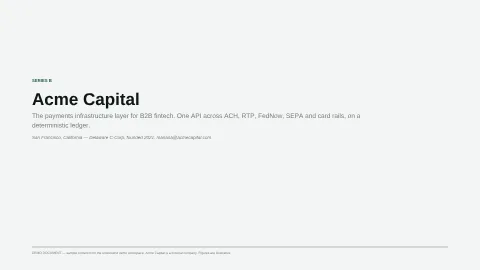
Read
Signed
Everyone has signed.
Step 1
Step 2
Jane Ellis
jane@northwind.example
Counterparty · Step 1
Sent
Document viewed
Disclosure accepted
Signed
Mariana Velez
mariana@acmecapital.example
Acme Capital · Step 2
Sent
Document viewed
Disclosure accepted
Signed
Each room has its own address, folders and settings. Files live once in your library and can be linked into as many rooms as you like.
Create a room for a raise, a sale or a partnership, with its own web address, investor ask, access and watermark defaults.
Create, nest and rename folders, and move documents between them.
An illustration: a file replaced with version 2, and three rooms that link it switching to version 2.
Upload a file once and link it into any room. Replace it with a new version and every room shows the new one; restore an older version at any time.
File types you can upload
Drag in files or a whole folder. PDFs and spreadsheets are shown as they are; Word, PowerPoint, Keynote and image files are converted to PDF.
Share a working HTML page, such as a model or a product demo, as a document in the room.
Permanently remove names, numbers and other sensitive content from a PDF before visitors see it.
Ask investors or counterparties to upload files into your room, and review each one before it appears.
Make a room read-only, export a sealed archive anyone can verify at /verify-archive, and archive the room when the deal is done.
Rooms have an access mode and allow and block lists. Share links send chosen files with a gate of their own, and you can revoke either at any time.
Every one of these controls is on every plan.
✓ Check your inbox. A one-time access link is on its way.
No expiry
Invite only, anyone with a verified email, password, or public. Each mode shows visitors a different gate.
Let in only certain emails or domains, and keep others out of a room for good.
Send chosen files with their own email check, password, expiry, visit limit and NDA. Revoke a link at any time.
Group visitors into audiences, limit folders and files to each audience, and choose who can download what.
Make visitors verify their email and accept your agreement before they can open a room or a share link.

jane@northwind.example · 2026-11-18 14:32 UTC
Stamp the visitor's email, the time and CONFIDENTIAL across every page, on screen and on download, and decide per file and per audience who can download.
People can ask to join an invite-only room, and visitors can suggest a colleague. You approve or decline each one.
Every visit is recorded page by page. undocsend tells you when someone opens a room and helps you follow up while they are still reading.
Jane Ellis · Northwind Ventures read Pitch deck — Series B
Time per page
Darker cells held the reader longer. Hover a page for its time.
For each document, see how long every visitor spent on each page, and which pages they skipped.
Visits, visitors and reading time across the workspace, for one room, or for one document.
Every person who entered a room, with their sessions, reading coverage, notes and emails in one place.
undocsend emails a recap after a first visit, and drafts a follow-up for you to approve when a visitor comes back.
Choose who gets visit emails, get an alert when someone opens a room from a country you name, and check what was sent in the alert log.
Send room activity to a Slack channel or to your own systems, with signed requests and automatic retries.
Every room has an assistant that answers from the room’s files and cites the page it used. You choose what it knows, read every conversation, and can switch each AI feature off.
Try a question
What's ARR today, and what does the plan say for FY26?
$4.6M ARR today, up from $1.1M at the Series A close. The FY26 plan is $12.97M ARR from 94 customers at a $138K average ACV.
Bring your own OpenAI, Anthropic, Google or xAI key. We add no markup: you pay your provider directly. If your key fails partway through an answer, we finish it on credits, so using your own key needs at least $5 of credits or automatic top-ups turned on.
What's ARR today, and what does the plan say for FY26?
$4.6M ARR today, up from $1.1M at the Series A close. The FY26 plan is $12.97M ARR from 94 customers at a $138K average ACV.
Pitch deck — Series B · p. 9Pitch deck — Series B · p. 18Financial model (3-year) · ARR sheet
Visitors ask questions in the room and get answers from your documents, with a link to each page it cites.
Give the assistant background that is not in your documents: your voice, your thesis, and research it can cite.
Visitors can ask your team a question. AI drafts the answer, a person approves and sends it, and you can publish it to the room FAQ.
Read every conversation visitors have had with the assistant in a room.
Document summaries, gaps the assistant could not answer, predicted questions and the other AI helpers, each of which you can turn off.
Visitors can point their own AI tools at your room through a machine view and a personal token. Text from watermarked files is left out.
Connect Claude, ChatGPT, Cursor or another MCP client to your workspace to build rooms, upload documents and read visitor activity, with your approval.
Buy AI credits in any whole-dollar amount from $5 to $5,000, or use your own AI key (we add no markup). Every trial includes 2,000 AI credits.
Turn a PDF into a template, send it to signers in the order you choose, and keep the signed copy with its Certificate of Completion. E-signature is a US-only beta. It is on every plan, with a fair-use limit on envelope sends every 30 days: Founder 500, Operator 1,500 and Studio 5,000.
Mutual NDA — Northwind Ventures Beta
Demo dataSigning order: in steps
Waiting on Mariana Velez (Step 2 of 2).
Step 1
Step 2Now
Jane Ellis
jane@northwind.example
Counterparty · Step 1
Sent
Document viewed
Disclosure accepted
Signed
Mariana Velez
mariana@acmecapital.example
Acme Capital · Step 2
Sent
Document viewed
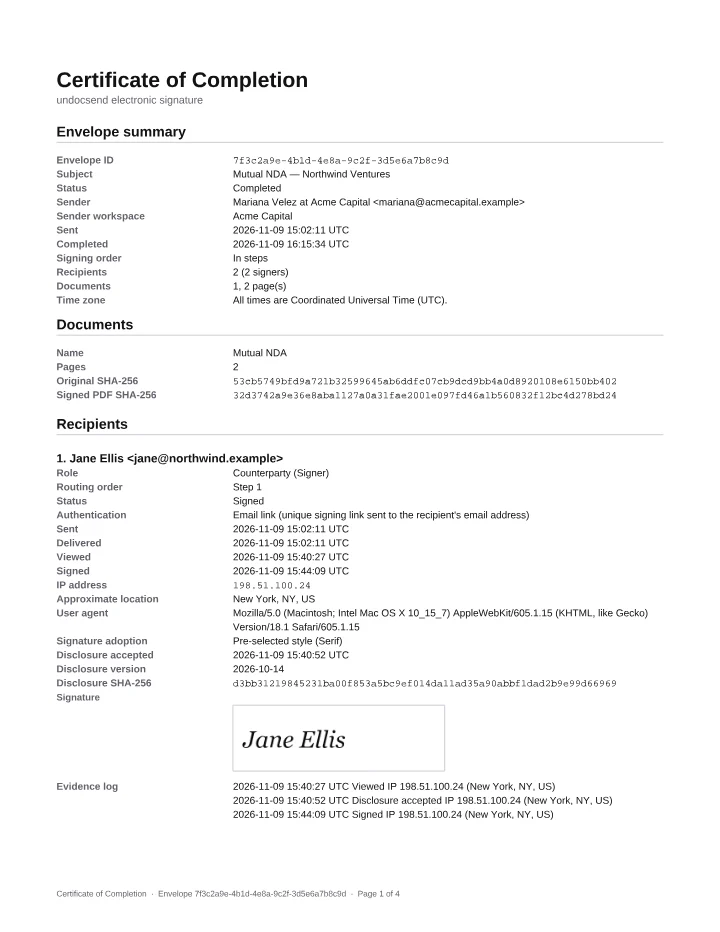
Place signature, initials, date, name and text fields on a PDF, name the recipients, and publish it for your team to reuse.
Send a template out for signature, see who has opened and signed it, and remind, correct or void it while it is out.
Everyone has signed.
Step 1
Step 2
Jane Ellis
jane@northwind.example
Counterparty · Step 1
Sent
Document viewed
Disclosure accepted
Signed
Mariana Velez
mariana@acmecapital.example
Acme Capital · Step 2
Sent
Document viewed
Disclosure accepted
Signed
Everyone signs at once, or in steps: each step is emailed only when the one before it has finished.
When everyone has signed, each party gets the signed PDF and a certificate listing every signer, timestamp, IP address and document hash.
Signed records are kept for 7 years after signing. A signer can request their copy at /signed-records even if the sender has closed their workspace.
fair-use limit · envelope sends every 30 days
A fair-use limit on envelope sends every 30 days, there to stop abuse: Founder 500, Operator 1,500 and Studio 5,000. One envelope is one send, however many people sign it.
Seats are unlimited on every plan. Plans differ only in how many rooms you run at once (Founder 1 room, Operator 5 rooms and Studio 15 rooms).
Invite as many teammates as you need as owners, admins or members, and change or remove them at any time.
Sign in with an email link, add a code from an authenticator app, and keep recovery codes for a lost phone.
A tamper-evident record of what your team changes in the workspace, which owners and admins can read and download.
Put your name, logo and colors on your rooms, serve them from your own domain, and send emails from your own address.
What happens to your workspace and its data when a trial ends or a subscription stops, and how long records are kept.
rooms you run at once
Monthly or annual billing, change or cancel at any time, and add a room beyond your plan for $15/mo.
We are working on Enterprise SSO (SAML) and Self-hosted edition. Neither is available yet.